name: title class: left bottom hide-count <!-- Slide Extras --> <!-- Title Slide --> <div class="talk-logo"></div> .talk-meta[ .talk-title[ # RStudio IDE Pro Tips ## .blue-light[Mind-Meld with the RStudio IDE] ] <div class="talk-author">Garrick Aden-Buie · Mario Ferrini · Greg Wilson</div> <div class="talk-institute">RStudio, PBC</div> <div class="talk-date">November 18, 2020</div> ] <style type="text/css"> /* Define title slide image or logo here */ .talk-logo { width: 200px; height: 750px; position: absolute; top: 6%; right: 4%; background-image: url('https://rstudio.com/wp-content/uploads/2018/10/RStudio-Logo-Gray.png'); background-size: contain; background-repeat: no-repeat; background-position: contain; } .talk-title h1 { margin-bottom: 0; } .talk-author { font-weight: bold; color: var(--blue); margin-bottom: 0; } .talk-institute { margin-top: 0.5em; } .talk-date { margin-top: 1em; } kbd, .kbd { padding: 0.1em 0.6em; border: 1px solid var(--text-lighter); font-family: var(--font-monospace); background-color: var(--text-lighter); color: var(--text); -webkit-box-shadow: 0 1px 0px rgba(0, 0, 0, 0.2), 0 0 0 1px #fff inset; box-shadow: 0 1px 0px 2px rgba(0, 0, 0, 0.2), 0 0 0 1px #fff inset; -webkit-border-radius: 3px; border-radius: 3px; display: inline-block; margin: 0 0.1em; line-height: 1.4; white-space: nowrap; font-size: 1em !important; } click { background-image: url('assets/img/click.svg'); background-size: contain; display: inline-block; width: 1.5em; height: 1.5em; vertical-align: bottom; } </style> --- class: middle .f2.zilla[ The test of the machine is the satisfaction it gives you. There isn't any other test. .hl-zilla.blue-light[If the machine produces tranquility it's right.] If it disturbs you it's wrong until either the machine or your mind is changed. ] .right.i.f4.blue[—Zen and the Art of Motorcycle Maintenance] --- layout: true class: center <h1 style="padding: 0.5em 1em;" class="mb2">Three Strategies for Satisfaction</h1> --- .flex.flex-column.items-center[ .h-25.ph4.flex.items-center.justify-center.order-3.bg-blue-washed.blue.f3[ .b[Discover] what the IDE can do for you ] ] --- .flex.flex-column.items-center[ .h-25.ph4.flex.items-center.justify-center.order-2.bg-green-washed.green-dark.f3[ .b[Mold] the tool to your workflow ] .h-25.ph4.flex.items-center.justify-center.order-3.bg-blue-washed.blue.f3[ .b[Discover] what the IDE can do for you ] ] --- .flex.flex-column.items-center[ .h-25.ph4.flex.items-center.justify-center.order-1.bg-orange-washed.orange.f3[ .b[Adapt] your workflow ] .h-25.ph4.flex.items-center.justify-center.order-2.bg-green-washed.green-dark.f3[ .b[Mold] the tool to your workflow ] .h-25.ph4.flex.items-center.justify-center.order-3.bg-blue-washed.blue.f3[ .b[Discover] what the IDE can do for you ] ] ??? There's always going to be a certain amount of friction coding is hard, right the goal is to reduce friction between you and thinking about your code listen to the friction is a signal, listen to the things that disturb you --- layout: false class: middle ### Set Up .f3.mb4.mt0[ 💼 .f4.code[usethis::use_course(".can-edit.key-course-link[gadenbuie/rstudio-ide-tips-demo]")] ] ### Follow the Slides .f3.mb4.mt0[ 🕸 https://.can-edit.key-slides-link[rstudio-ide-tips.netlify.app] ] ### In the chat window .f3.mb4.mt0[ 🤔 .b[How do you and RStudio get along .green[best] and .orange[worst]?] ] --- ## RStudio... .flex[ .w-50[ .b.green-dark.zilla.f3[gets me] .can-edit.key-rstudio-gets-me[ - Everything in one place - 4 panes to work with - Projects + sane file paths - Additional tools like `git` - Rainbow parentheses! - Tooling for package development - Running lots of scripts in the job pane ] ] .w-50[ .b.orange.zilla.f3[gets me not] .can-edit.key-rstudio-gets-me-not[ - Color preview for CSS colors - Too many panes! - Paths can be tricky - Running lots of scripts - RStudio in other languages, like Spanish - Non-ASCII character paths - Having lots of tabs (or closing tabs) ] ] ] --- # Check Your Keyboard .flex.f3[ .w-third.tc[ <img src="assets/img/logo-apple.svg" height = "250px" /> <kbd>Cmd</kbd> <kbd>⌘</kbd> <kbd>Option</kbd> <kbd>⌥</kbd> ] .w-third.tc[ <img src="assets/img/logo-windows.svg" height = "250px" /> <kbd>Ctrl</kbd> <kbd>Alt</kbd> ] .w-third.tc[ <img src="assets/img/logo-linux.svg" height = "250px" /> .f1[👈] ] ] --- # .green[Set Up Your Workspace] - **Open .code[R/00_general.R]** - What panes are available? - Where do you put them? - Drag to resize - Pane Layout - Half Screen - Full Screen <img class="absolute bottom-2 right-2 w-50 shadow-4 ba b--silver bw1" src="assets/img/workspace.png"> --- class: f3 # Move Between Panes .flex[ .w-third[ Press <kbd>Ctrl</kbd> + ... ] .w-third[ <kbd>1</kbd> → Source <kbd>2</kbd> → Console <kbd>3</kbd> → Help <kbd>5</kbd> → .can-edit[…] <kbd>6</kbd> → .can-edit[…] <kbd>7</kbd> → .can-edit[…] <kbd>8</kbd> → .can-edit[…] <kbd>9</kbd> → .can-edit[…] ] ] .absolute.bottom-2[🖖 **Stretch your fingers**] --- class: f3 # Zoom To Pane .flex[ .w-third[ Press <kbd>Ctrl</kbd> + <kbd class="orange">Shift</kbd> + ... ] .w-third[ .orange[<kbd>1</kbd> → Source] .orange[<kbd>2</kbd> → Console] <kbd>3</kbd> → Help <kbd>5</kbd> → Files <kbd>6</kbd> → Plots <kbd>7</kbd> → Packages <kbd>8</kbd> → Environment .orange[<kbd>9</kbd> → Viewer] ] ] --- layout: true # Zoom To Pane .w-50.fl[ Run this code and then press <kbd>Ctrl</kbd> + <kbd>Shift</kbd> + <kbd>1</kbd> ```r library(dplyr) View(starwars) ``` ] .w-50.fr[ <img src="index_files/figure-html/unnamed-chunk-4-1.png" width="100%" /> <img src="index_files/figure-html/unnamed-chunk-5-1.png" width="100%" /> ] --- <!-- First Slide --> --- .w-50.fl[ .blue.zilla.f4[Pipe into View()] ```r starwars %>% filter(species == "human") %>% View() ``` ] --- .w-50.fl[ .green-dark.zilla.f4[Give your viewer a name] ```r starwars %>% filter(species == "human") %>% * View("humans") ``` ] --- layout: false # Getting Around Solve the mystery of the `black_box()` function... .w-50.fl.tc[ Jump Anywhere <img src="assets/img/go-to-file.png" height = "90px"> ] .w-50.fl.tc[ Go Back <img src="assets/img/go-back.png" height = "90px"> ] .w-50.fl.tc[ Jump to Function .code[.bg-yellow[black_box]()] <kbd>F2</kbd> ] .w-50.fl.tc[ Jump to Help .code[.bg-yellow[comment](x) <- "..."] <kbd>F1</kbd> ] --- # Code Style - Jump to `code_style.R` - Use the [styler](https://styler.r-lib.org/) package for magically clean code - Use `identity()` or `I()` to walk through pipe steps - Move code up/down to reorganize - Add new lines and fix indentation: <kbd>Ctrl</kbd> + <kbd>I</kbd> - Let your code breathe vertically! - Change order of selection in a `select()` - Use multiple cursors by <kbd>Cmd</kbd> + <kbd>Opt</kbd> + <click></click> ??? I use `Ctrl + Shift + S` for style selection and `Ctrl + Shift + Cmd + S` for style file --- # Multiple cursors .mb5[ Click to create new cursors .fr.tr.lh-copy[<kbd>Cmd/Ctrl</kbd> + <kbd>Opt/Alt</kbd> + <click></click>] ] .mb5[ Click and drag to select/create new cursors .fr[<kbd>Opt/Alt</kbd> + <click></click> and drag] ] .mb5[ Create new cursors with the keyboard .fr[<kbd>Cmd/Ctrl</kbd> + <kbd>Opt/Alt</kbd> + <click></click>] ] .mb5[ Create new cursors from selection .fr[<kbd>Find and Add Next</kbd> <kbd>Find and Select All</kbd>] ] ??? - Find all - `Cmd + Alt + F` - Find and Add Next - `Cmd + D` --- # Align Arguments and Assignment If code is more vertical, alignment is easier. - Align blocks of similar arguments or names or anytime there's repetition - Alignment makes it easier to scan for problems - [AlignAssign](https://github.com/seasmith/AlignAssign) --- # Addins [addinslist](https://github.com/daattali/addinslist) — An addin to .b[find] and .b[install] great addins #### Some Favorites - [remedy](https://github.com/ThinkR-open/remedy) - [datapasta](https://github.com/MilesMcBain/datapasta) - [gistfo](https://github.com/MilesMcBain/gistfo) - [ermoji](https://github.com/gadenbuie/ermoji) #### Make Your Own - [shrtcts](https://pkg.garrickadenbuie/shrtcts) --- ## Coming Soon to an RStudio Near You New in **RStudio 1.4** along with a few other awesome features ⭐ Command Palette 🌈 Rainbow Parens 👓 Visual Markdown 🍱 New Source Column 💾 [RStudio Preview](https://rstudio.com/products/rstudio/download/preview/) --- # .orange[Organize Your Code] Add .b[section labels] by pressing <kbd>Cmd/Ctrl</kbd> + <kbd>Shift</kbd> + <kbd>R</kbd> ```r # Library ----------------------------------------------------------------- ``` Browse section labels <img src="assets/img/navigate-section-headings.png" /> --- # Run Script as Background Job .flex[ .w-50.tc[ Source as Local Job 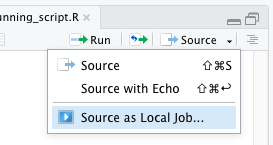 ] .w-50.tc[ Configure Job Settings 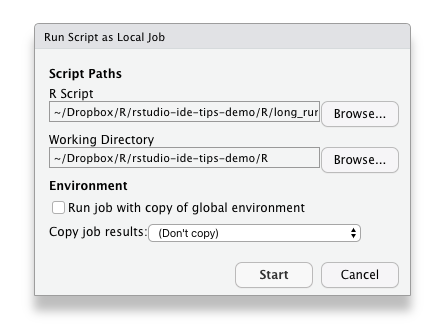 ] ] ??? - Default settings - Return results to environment - Watch progress in the console - Use objects from global env --- # .orange[Let It Go...] .w-50.tc.pb4.pt2.ph3.fl[ .orange.f4[Restart R Session] <kbd>Cmd</kbd> + <kbd>Shift</kbd> + <kbd>0</kbd> <kbd>Ctrl</kbd> + <kbd>Shift</kbd> + <kbd>F10</kbd> ] .w-50.tc.pb4.pt2.ph3.fl[ .blue.f4[Run Up To Here] .code.bg-yellow.white.pv1.ph2.mr3[R] <kbd>Cmd/Ctrl</kbd> + <kbd>Opt/Alt</kbd> + <kbd>B</kbd> .code.bg-pink.white.pv1.ph2.mr3[Rmd] <kbd>Cmd/Ctrl</kbd> + <kbd>Opt/Alt</kbd> + <kbd>P</kbd> ] .w-50.mh-auto.tc[ .green-dark.f4[Always start with a blank slate] `usethis::use_blank_slate()` https://rstats.wtf/save-source.html 🎛 Global/Project Settings ] --- # Use Projects - [Project-oriented workflow](https://www.tidyverse.org/blog/2017/12/workflow-vs-script/), Jenny Bryan - [Why should I use the `here` package](https://malco.io/2018/11/05/why-should-i-use-the-here-package-when-i-m-already-using-projects/), Malcom Barrett - [Use Alfred to launch projects](https://twitter.com/hadleywickham/status/968624630276804608), Hadley Wickham -- .mt5[  ] --- # Infinite Moon Reader Automatically renders an R Markdown document whenever you save 💾 1. Jump to `docs/try/infinite_moon_reader.Rmd` 1. Edit the document and press save to see it in action ??? - Show extract variable - Show insert new chunk - Show insert new chunk within a chunk --- exclude: true # Clean Tuition Jump to `R/clean_tuition.R` Let's review together, refactoring and restyling the code Make a function to `tidy_tuition()`, on the way we may learn how to - Run current function definition - Use `browser()` - Insert roxygen skeleton - Rename in scope --- class: center middle # Resources for learning more .f3[ [RStudio IDE Cheat Sheet](https://github.com/rstudio/cheatsheets/blob/master/rstudio-ide.pdf) [@rstudiotips](https://twitter.com/rstudiotips) ] -- .w-100.tc.absolute.bottom-2.left-0[ [@grrrck](https://twitter.com/grrrck) .ph2[·] [@gvwilson](https://twitter.com/gvwilson) ] --- class: inverse center middle # Bonus Round --- # Snippets .ba.br2.bw1.b--light-gray.ph1.shadow-3[Global Options] → Code → Edit Snippets -- .b[Snippet Syntax] ``` snippet s3generic ${1:generic} <- function(x, ...) { UseMethod("${1:generic}", x) } ${1:generic}.${2:method} <- function(x, ...) { ${0} } ``` -- .b.blue[Try this one:] `shinymod` --- # .green-dark[Themes] #### A collection of many RStudio themes [garrickadenbuie.com/project/rsthemes/](https://www.garrickadenbuie.com/project/rsthemes/) #### Install and try themes ```r remotes::install_github("gadenbuie/rsthemes", dependencies = TRUE) rsthemes::install_rsthemes() rsthemes::try_rsthemes() ``` --- # .green-dark[rsthemes addins] .center[ 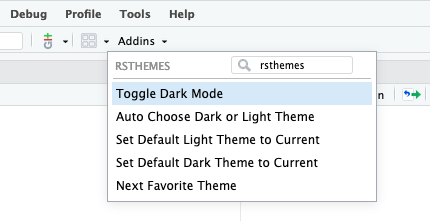 🌇 Toggle Dark Mode 🌉 Auto Choose Dark or Light Theme ❤️ Next Favorite Theme ] --- # .green-dark[Assign shortcuts to addins] .flex[ .w-50[ 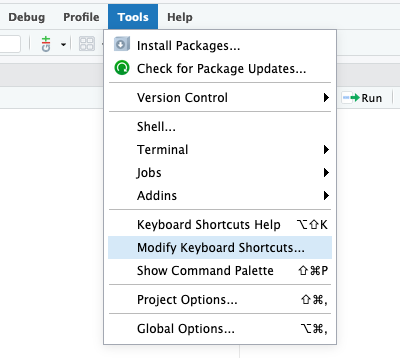 ] .w-50[ .b[Toggle Dark/Light] <kbd>Ctrl</kbd> + <kbd>Option</kbd> + <kbd>D</kbd> .b[Next Favorite Theme] <kbd>Ctrl</kbd> + <kbd>Option</kbd> + <kbd>N</kbd> ] ] --- # Keyboard Shortcuts .flex.flex-wrap[ .w-50[ 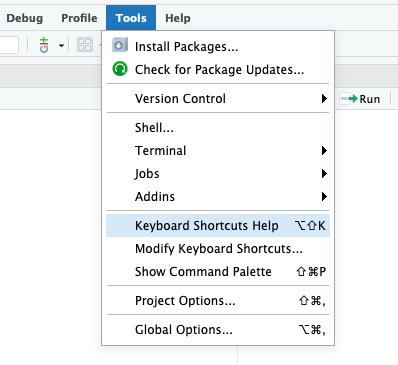 ] .w-50[ #### Reference - Tools > Keyboard Shortcuts Help - [RStudio IDE Cheat Sheet](https://raw.githubusercontent.com/rstudio/cheatsheets/master/rstudio-ide.pdf) .mt5[ #### .green-dark[Your Turn] ] Take 3 minutes to create new shortcuts for - Find and Add Next - Find and Select All ] ] <div class="countdown" id="timer_5fb54588" style="right:0;bottom:0;" data-warnwhen="0"> <code class="countdown-time"><span class="countdown-digits minutes">03</span><span class="countdown-digits colon">:</span><span class="countdown-digits seconds">00</span></code> </div> --- # .green-dark[Decorate RStudio] 🎛 There are **many** options to check and adjust in .ba.br2.bw1.b--light-gray.ph1.shadow-3[Global Options] #### Code > Display -- .w-50.fl[ #### Appearance - Fonts - Like ligatures? Try [hasklig](https://github.com/i-tu/Hasklig/) - Themes ] -- .fr[ #### Hasklig 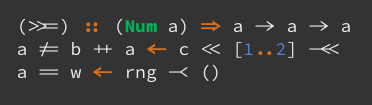 #### Source Code Pro 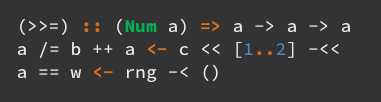 ]